We’ve been driving innovation in our industry for over 20 years. Talk to one of our experts and take the next step.

Contact
arrow_left_alt

AI / Copilot

We’ve been driving innovation in our industry for over 20 years. Talk to one of our experts and take the next step.

Contact
arrow_left_alt

Productivity

arrow_left_alt

Industries

We’ve been driving innovation in our industry for over 20 years. Talk to one of our experts and take the next step.

Contact us

February 10th, 2026

Inside the system: A look at Business Central for rental companies

Rental industry

Choosing a new ERP system isn’t just about features – it’s about how it actually feels to use every day. We understand that.

Table of contents

For rental companies, the system needs to support fast-moving operations: equipment tracking, contracts, logistics, billing, and asset visibility. In this guide, we’ll walk you through what Business Central can look like in practice and how it supports your rental workflows.

This is not a technical manual. It’s a visual tour designed to help you understand how the system supports daily rental operations – from order entry to asset management.

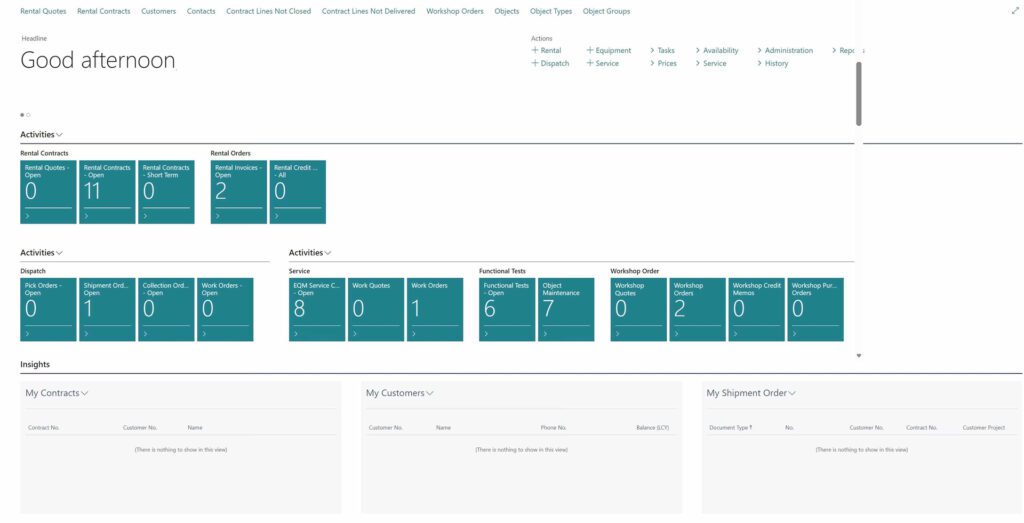
A complete overview of your rental operation

The dashboard is the starting point for daily work. It gives users an instant snapshot of ongoing rentals, equipment availability, and operational tasks — all in one view.

From here, teams can quickly access rental contracts, service orders, customer information, and financial data without switching systems. Key activities and alerts are visible immediately, helping managers prioritize work and respond faster.

For rental businesses handling multiple assets and projects at once, this centralized overview creates structure and control across the entire operation.


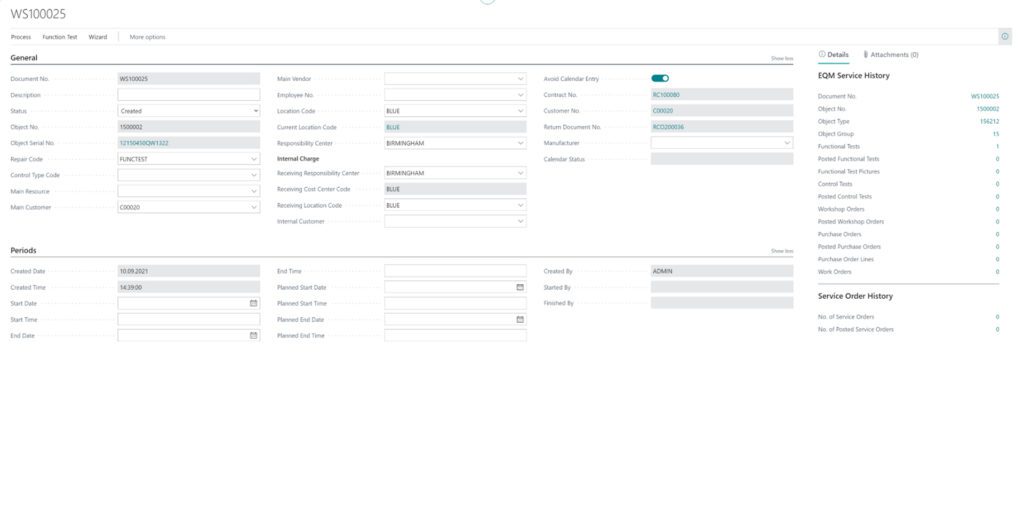
Structured service and maintenance management

The service card provides a detailed view of maintenance activities for each asset. Rental companies can register inspections, repairs, and service history directly in the system.

Every action is documented and connected to the asset record, creating a full maintenance timeline. This improves equipment reliability, supports compliance requirements, and helps extend asset lifespan.

Service teams can plan work efficiently while management gains visibility into maintenance costs and downtime.


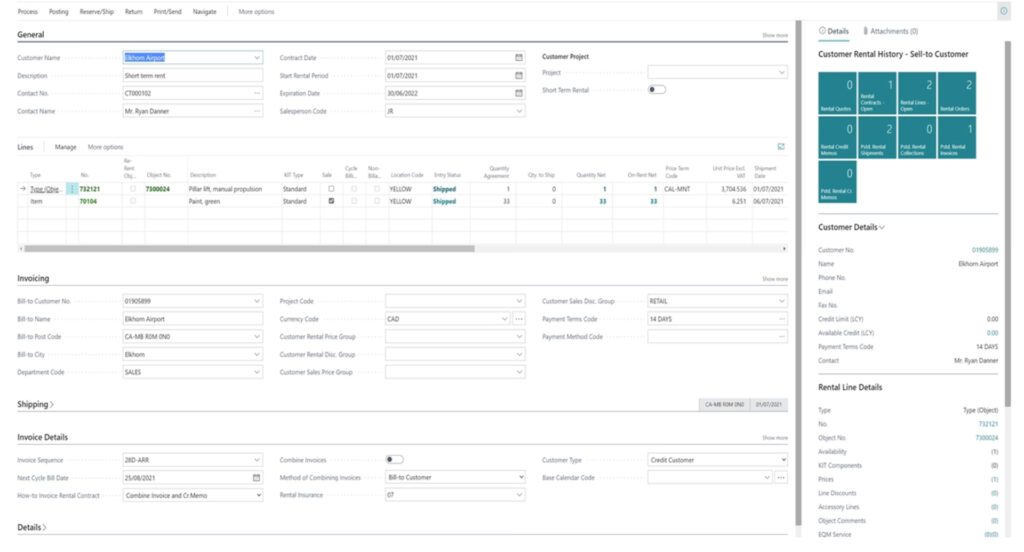
Rental contracts with full operational control

The rental contract screen connects customers, assets, pricing, and timelines in one structured workflow.

Users can create contracts quickly, assign equipment, define rental periods, and manage pricing agreements — all while the system automatically checks availability. This prevents double bookings and reduces manual errors.

Because contracts are directly linked to billing and asset tracking, every rental is financially and operationally controlled from the start.

For high-volume rental environments, this ensures accuracy, speed, and consistency.


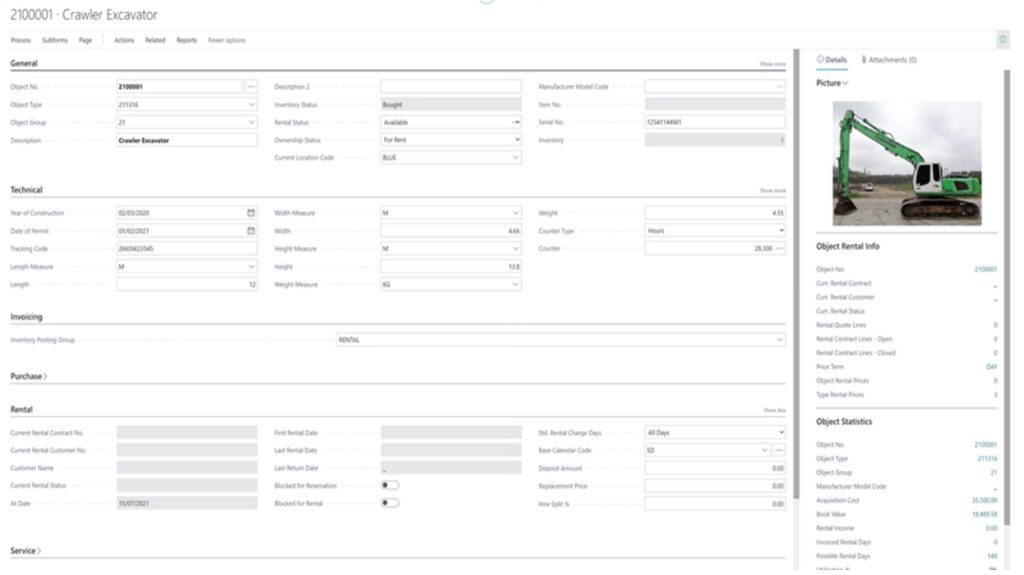
Complete visibility into every asset

The object card acts as a digital profile for each piece of equipment. It contains technical details, status, location, service history, and rental activity in one place.

Teams always know whether an asset is available, rented, under maintenance, or reserved. This visibility improves planning, reduces idle equipment, and increases utilization.

Having structured asset data allows rental businesses to manage growth without losing control of inventory.


Designed for the reality of rental operations

Rental companies operate in a fast, asset-driven environment. The system must support that pace without adding complexity.

Business Central provides a structured, modern platform that helps rental organizations:

  • Reduce administrative work
  • Increase asset visibility
  • Improve billing accuracy
  • Optimize equipment usage
  • Scale operations confidently


If you’d like to see how this works for your specific rental business, we can walk you through a live demonstration tailored to your workflows.

Contact us
close

Get in touch!

Fill in your details and we’ll get back to you shortly!

Please enter your first name.

Please enter your last name.

Please enter your email.

Please enter your phone number.

By contacting us, your personal data will be processed in accordance with NAB’s privacy policy.

Related news

close

Subscribe to our newsletter

Get the latest industry news and updates delivered straight to your inbox.

Please enter your first name.

Please enter your last name.

Please enter your email.

By subscribing to our newsletter, your personal data will be processed in accordance with NAB's privacy policy.