September 12th, 2024
It can be challenging to determine if your business system is no longer meeting your needs, but there are several signs that may indicate it’s time for a change. Here are some key things to watch out for:
If you recognize several of these issues, it may be a sign that your business system is becoming outdated, and it might be time to consider upgrading or switching to a more modern system that better suits your needs.
August 28th, 2024
Microsoft has been at the forefront of artificial intelligence (AI) innovation, leveraging its extensive research and development capabilities to create advanced AI technologies. Here are some of the core AI technologies developed by Microsoft:
Azure Machine Learning: A cloud-based service that allows data scientists and developers to build, train, and deploy machine learning models quickly. It provides tools for automated machine learning, data labeling, and model management.
Azure Cognitive Services: A suite of pre-built APIs that allow developers to integrate AI capabilities such as vision, speech, language, and decision-making into their applications. These include services like Computer Vision, Speech to Text, Text Analytics, and Anomaly Detector.
An open-source deep learning toolkit that supports a wide range of neural network types, allowing for scalable and efficient training of models. CNTK is known for its speed and flexibility, supporting both Python and C++ APIs.
A comprehensive framework for building enterprise-grade conversational AI experiences. The Bot Framework enables developers to create bots that can interact with users across various platforms like Microsoft Teams, Skype, Slack, and more.
Solutions that bring AI capabilities to edge devices, allowing for real-time data processing and decision-making. This includes Azure IoT Edge, which extends cloud intelligence to local devices.
A service within Azure Cognitive Services that allows users to build and deploy custom image classification models. It simplifies the process of training models with labeled images, enabling quick and efficient deployment of custom vision solutions.
An internal research division dedicated to advancing the state of the art in AI. Microsoft Research AI focuses on areas such as machine learning, natural language processing, computer vision, and human-computer interaction.
AI-driven insights and analytics embedded within Microsoft’s Dynamics 365 business applications. These AI capabilities help organizations improve customer experiences, optimize operations, and drive innovation through data-driven insights.
These core AI technologies showcase Microsoft’s commitment to advancing AI and making it accessible for businesses and developers to solve complex problems and create innovative solutions.
We help you explore where AI can create real value in practice.
Contact usJune 13th, 2024
Here, we show you how to preview your postings in Business Central.
With the Preview Posting feature, you can review transactions and see how they will appear before you actually post them. This way, you can avoid incorrect postings and potential corrections.
When you are on an invoice, click on Posting in the menu – then select Preview Posting. In the new window, you can see which transactions will be created if you were to post the invoice as it is. By clicking on the numbers under Number of Transactions, you can also analyze further regarding dates, accounting accounts, and other values.
It’s perfect to use when you’re unsure if your posted invoice will create its transactions in the system correctly. By using preview posting, you can save time by avoiding the need to reverse your invoices.
May 21st, 2024
A panel of testers at Forbes Advisor evaluated several ERP providers throughout the year based on 25 different factors, and Microsoft Dynamics 365 came out on top! This recognition confirms Microsoft’s commitment to delivering high-quality solutions that meet the individual needs of customers across various industries. With extensive features, seamless integration capabilities, and a focus on innovation, Microsoft Dynamics 365 continues to lead in ERP systems.
An ERP system, or Enterprise Resource Planning system, acts as the brain of your business. It’s a software solution that helps you manage and integrate crucial parts of your operations, such as sales, purchasing, inventory, production, finance, and human resources, all under one roof.
With an ERP system, you can streamline and automate your business processes, coordinate different departments, and gain a comprehensive view of how your business operates, leading to increased productivity, cost savings, and better decision-making.
In summary, an ERP system helps you work smarter, not harder!
Read more about Forbes Advisor’s review of Microsoft Dynamics 365 here! Best ERP Systems Of 2024 – Forbes Advisor
Read more about finding the right ERP system that fits your business needs here!
We help you explore how Dynamics 365 could support your way of working.
Contact usMay 21st, 2024
Choosing the best ERP system for your business can be challenging. With so many different software and vendors to choose from, it can feel like navigating through a jungle. However, an effective ERP system is crucial for success in today’s modern business climate. Here are some simple tips for choosing the right ERP system for your business!
To find the best ERP system for your business, it’s important to start by defining your specific business needs and goals. Think of this as the foundation for your journey to implementing a fully functional ERP system. By clearly defining what you need and what goals you have from the outset, you can ensure that every step in the process contributes to achieving these goals effectively.
Make sure these needs and goals are included in every part of the ERP system selection process – from comparing different options to customizing and integrating the chosen solution into your existing structure. By keeping your needs and goals in mind throughout the process, you can ensure that the chosen ERP system not only meets your current requirements but also supports your long-term goals.
Before deciding on an ERP system, take a close look at how your business processes work. It’s important to understand what you need from the system to best fit your needs. Consider how your daily work looks and how it may change in the future. Give each department the opportunity to tell what they wish for from the new system. Perhaps there are manual processes that can be automated or ways to reduce the margin of error in data management. By examining the company closely and documenting your needs and desires, you save both time and money in the long run.
About Microsoft
Once you have clarified what you want to achieve with your system, it is important to clearly write down and communicate which specific features your company needs the system to solve. It is also important to clearly document which features are most important and therefore should be prioritized. This will also save you both time and money!
To get a better feel for how different systems work in practice, it’s a good idea to request demonstrations and test drives. This way, you can see the systems in action and assess how they fit your needs. It also gives you the opportunity to work with the system and discover its user-friendliness and functionality.
May 10th, 2024
Do you want to avoid posting invoices one by one and be more efficient by posting many that you know are prepared and ready to be invoiced?
In the Sales Invoices list, mark the invoices you want to post. In the menu, click on Post and then Post again.
In the dialog box that appears, you see how many invoices will be invoiced. Click Yes if you want to post.
With this, you can save time and many clicks in the system!
May 10th, 2024
Choosing a business solution is both an important and big decision, but it can also feel difficult to know what suits you. Here are 6 tips to consider when selecting a business solution!
An optimal business solution is a fundamental pillar for your business to grow and develop. The right business solution not only provides an overview of the organization but also streamlines your workflow by automating unnecessary routines, creating meaningful decision-making bases, improving customer management, and fostering a more sustainable work method.
Choosing a business solution is both an important and big decision, but it can also feel difficult to know what suits you. Here are 6 tips to consider when selecting a business solution!
1. What are your business’s specific needs?
It may seem obvious, but the first and most important step to finding the right business solution is to figure out what you actually need! The most efficient way to map out your needs is through an analysis of your business. What works well, what doesn’t work as well, what challenges do you face, and what problems do you want your business system to solve?The clearer the picture you have of your needs, the easier it will be to find what’s right for you!
2. Involve your employees!
Switching to or acquiring a new business system is a significant decision that leads to major changes for the entire organization, so it’s important to involve your employees in the process. When it’s time to start thinking about what you want your business solution to do for you, a discussion among employees is a good start. This way, you can get to the bottom of what different parts of the organization think and feel.Remember, no one knows the shortcomings of your current system better than its users!
About Microsoft
3. Turn your needs into features!
Now that you have a clear understanding of your needs, it’s important to translate these into actual features in a business system! What do you want your business system to include to meet the needs you’ve identified?Set expectations for what you want from your business solution!
4. A cloud-based business solution?
Another tip for choosing the right business solution is to consider whether you want a cloud-based system. There are several advantages to using a cloud-based business solution, such as the ability to access the system from various devices no matter where you are.
5. What do you think the future will look like?
The right business solution is an investment that should benefit you today and in the future. Therefore, it’s also important to consider your business’s potential for growth with a business solution, or if the system lacks the capacity to match your development.The right business solution should contribute to your development, not hinder it!
6. Talk to us!
Our final tip is to talk to us! We understand that choosing the right business system can be tricky, but we are here to help you find the right solution in the jungle of options. We have experience helping companies find the right solution, big and small, regardless of industry.
May 2nd, 2024
The benefits of moving your business solution to the cloud are numerous and worth reiterating periodically if you’re considering switching to an online business solution.
There are many advantages to choosing a cloud-based business solution, and it is worth repeating them regularly. In the cloud, you have the opportunity to scale your business solution more easily and to adapt it cost-effectively according to your needs. You can smartly add or remove functionality, users, and more. For instance, if you need to…
And so on.
With an online business solution, you will always be updated with the latest version, meaning you never get stuck in an old version. Your business solution is upgraded automatically twice a year at no extra cost, saving you both money and time. This means you get all the new improved features with each version and always have the latest on the market.
ERP
Concerned about security? The safest place for your business is in the cloud. By choosing Microsoft’s cloud products, you can trust that resources are dedicated 24/7 to maintaining the highest possible IT security for you.
Another advantage if you choose Microsoft’s cloud application Business Central is that it is part of Dynamics 365 and thus shares the same database with many other smart apps. You then connect your ERP system with apps for CRM, marketing, customer service, or follow-up, and information is synced between the applications. Smart AI technology is also built into the systems.
It doesn’t matter if you have a small or large company, the cloud is suitable for everyone. Everyone can take their business to the cloud. If you are currently using an old version of NAV or Business Central on-prem, we are experts at moving you to the cloud. We have all the tools to help you, and we have done it many times before with our clients.
We help you make the transition smoothly—without disrupting your business.
Contact usApril 24th, 2024
We present the latest updates in Dynamics 365 Business Central as part of the Wave 1 upgrade. Below are four of the newest features and updates in Business Central.
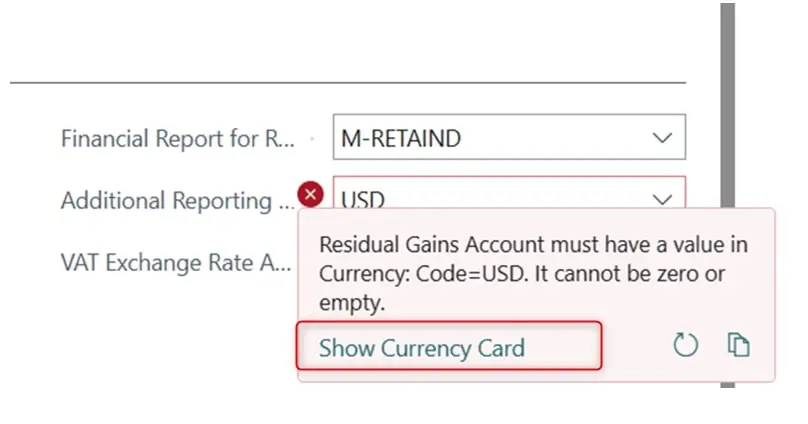
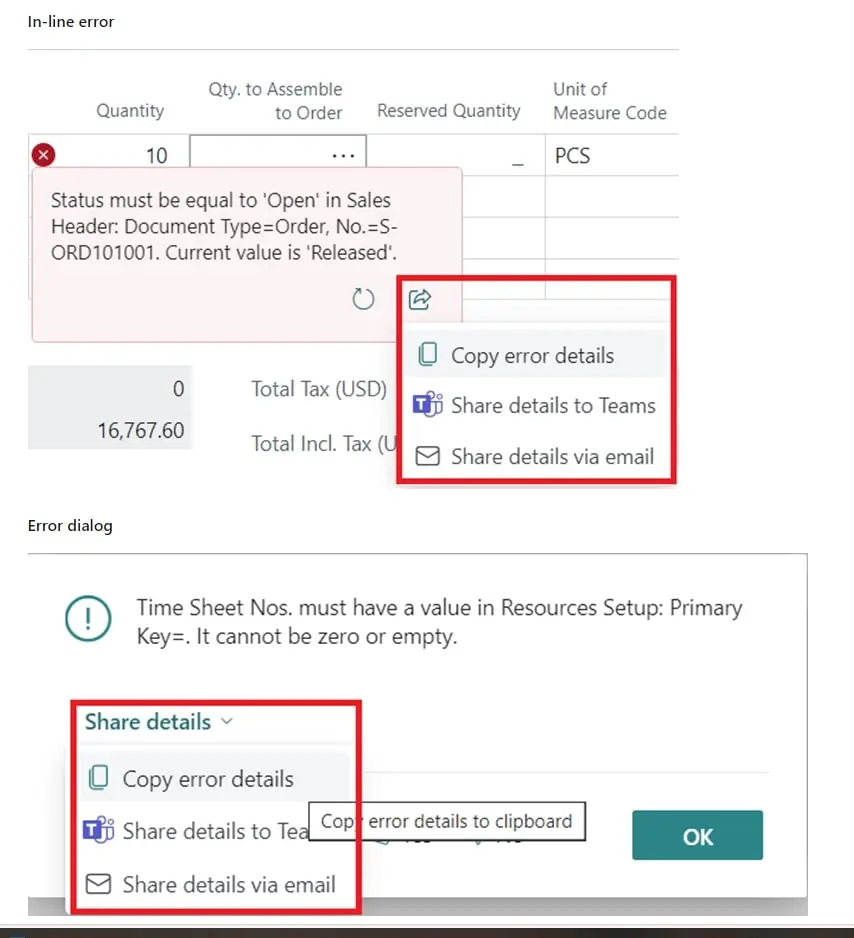
When an error message appears, BC24 provides the option to directly navigate from the error message to the table where the error needs to be corrected. For example, if an account is missing in the currency table. There is also the option to share the error message on Teams or via email.
![]()

At the account level, a sub-table can be activated that retains information about the amount in the original currency, allowing the account’s total to be revalued to a new exchange rate, similar to the function available for bank accounts and accounts receivable.
In several parts of the system, it will be possible to chat with the co-pilot to find information or ask questions about functions and how certain tasks should be performed.
In BC24, it is possible to add multiple files in the drag-and-drop function.
April 4th, 2024
Did you know that you can add Extra Texts to your items that automatically print out, like a comment line under the item when you pick it up on a sales invoice? We’ll tell you how!
Go to the item in the item registry and navigate to Related – Item – Extra Texts to enter the information that will be printed out. You also need to check the Use Extra Texts box on the item card if you want them to automatically print out as soon as you, for example, pick up the item on a sales document.
By adding Extra Texts to your items, you automatically get additional information without having to keep track of it yourself.